
Using the “COSTAR” Framework in ChatGPT for Lesson Creation
Learn how to use the CO STAR Framework to prompt and critically use Curriculum Builder in ChatGPT to support lesson planning in adult education. Please note, this prompting framework can be used in any LLM like Claude and Gemini too. “Curriculum Builder” is a specific GPT from Open AI.
DigCompEdu Competence Area(s)
Digital resources, Teaching & learning
Time
Preparation time 10 minutes
Implementation time 30 minutes
Educator Progression Level
Newcomer
Target groups
Adult Educators
Minimum student digital skill level
Basic
Minimum student language level
A1
🎓 Learning Objectives
Students will be able to…
- Engage with lessons that are tailored to their learning level and needs.
- Experience more clearly structured lessons, with transparent objectives and activities that help them understand what they are learning and why
- Learn from well-paced activities (e.g. discussions, role plays, practice tasks) adapted to their learning level
Ingredients
| Tool / Resource | Quantity | Purpose / Use |
| ChatGPT account (paid or free) | 1 | Access and use curriculum builder |
| Sample curriculum or themes | 1-2 | For prompt input |
Utensils
- Computer or tablet with internet access
- Text editor (Word or Google Docs) to review, adapt, and format lesson plans
- Printer (optional)
🥣 Preparation – Before Implementation
- Go to https://chat.openai.com.
- Log in or create an account.
- Click on Explore GPTs in the left menu.
- Search for Curriculum Builder. Or go directly to this link: https://chatgpt.com/g/g-oJTR2rYro-curriculum-builder
🔥 Implementation Steps
- Consider what you are creating from the “conversation starters” ie. lesson plan, recommend an activity, relevant resources, or redesign my curriculum
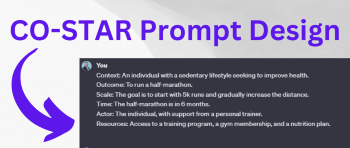
- Use the Co-Star Framework to prompt
- C – Context – Set the background for the task (ie. B2 German for adult learners)
- O – Objective – What exactly do you want the AI to produce? (ie. a 60 min lesson on vocabulary for finding a job)
- S – Style – The writing or structural style you want (ie. communicative approach, grammar lesson)
- T – Tone – How should the output feel? (ie. keep it encouraging and for informal learning context)
- A – Audience – Who is the end user? (ie. B2 German level adult learner)
- R – Response Format – How should the output be structured (ie. present as a table with activities, aims, and in line with BAMF course requirements)
- Write your own prompt
- Example:
- [CONTEXT] I teach adult learners in an official BAMF German integration course in Germany at B2 level, working towards the DTZ/B2 certificate. [OBJECTIVE] Create a 45-minute lesson plan on ‘Wohnen und Mieten’ incorporating modal verbs in context, with clear objectives, key vocabulary, interactive activities, and a short formative assessment. [STYLE] Use a communicative approach balancing grammar and real-life application, including speaking, listening, and grammar components. [TONE] Keep the tone practical and encouraging, suited to adult learners navigating everyday life in Germany. [AUDIENCE] All content should be for B2 level. [RESPONSE FORMAT] Present it as a table with columns for time, phase, activity description, aim, and materials, in line with BAMF course requirements.
- Review & Adapt Content
- When the lesson appears, do NOT read it top to bottom. Look at the structure (intro → practice → reflection), activity ideas, and timing.
- Tip: Ask yourself: “What would I keep?” “What would I change?”
- Check vocabulary for appropriateness and clarity
- Adjust examples for cultural sensitivity
- Add local references or topic-specific terms
- Request differentiated versions using specific, short prompts like:
- “Simplify this for low-literate learners” or
- “Make a B1-level activity for this lesson”
- REMINDER: Curriculum Builder creates a first draft, you must use your teaching expertise to finalize it.
- Copy the lesson plan into your word processor or ask ChatGPT to create downloadable version (word)
- Format and Finalize the lesson plan for your class.
- Remove emojis, adjust titles, add authentic wordings to descriptions
- Save as an editable/shareable file (PDF or Word)
- 8. Prompt ChatGPT to create interactive features of the generated content
- Example Prompt: Create a simple role-play activity for adult learners in this context [living and renting]. Include 3-4 guiding questions and simple language suitable for [B1-B2] adult learners
- Example:
- Person A: Landlord/Landlady explaining rules of the apartment
- Person B: Tenant asking questions about the rules
- Extra tip: Create roleplaying cards on Canva https://www.canva.com/templates/?query=role-playing-cards
🧂 Differentiation & Inclusion
- Trainers can prompt for various types of lesson material creation. Try out different ones based on learners’ needs:
- Multiple reading or grammar levels
- Cultural relevance
- Accessibility needs
TIP: Always review AI outputs critically. Ask Curriculum Builder to adapt and adjust your curriculum based on your target learners and course topic.
🍴 Assessment & Feedback
Not available
⚠️ Ethics, Privacy & Safeguarding
- No learner names or private data should be entered into ChatGPT.
- Ensure school policies allow use of AI-generated educational materials if using the created materials from “Actions”
- Bias mitigation strategies
- Review generated activities for cultural sensitivity and inclusivity
- Check that examples and scenarios are appropriate for your student population
🍱 Extensions / Follow‑Ups
- Homework: Trainers create a full lesson with Curriculum Builder for their next class.
- Peer review: Share AI-generated materials and give feedback.
- Practice: Use the GPT to create worksheets, vocabulary lists, or role plays.
🔗 Cross‑Subject Link
- Explore: Ask ChatGPT to generate content for exams or TELC preparation.
References & Resources
CEFR Level Descriptors – Guidelines for language proficiency levels
AI in Education Guidelines – Ethical guidelines for educators on using artificial intelligence
ChatGPT – https://chat.openai.com
Co-Star Framework: https://medium.com/@frugalzentennial/unlocking-the-power-of-costar-prompt-engineering-a-guide-and-example-on-converting-goals-into-dc5751ce9875
OpenAI Usage Guidelines – https://openai.com/policies
Curriculum Builder GPT (available in ChatGPT’s Explore section)
Prompts for Teachers https://www.youtube.com/watch?v=8AJvOiUSmeI