
Translating the World Around You – A Google Translate Camera Workshop
Use Google Translate's camera feature to help adult migrant learners read and understand signs, menus, labels, and everyday text in their environment.
Τομέας(-είς) ικανοτήτων DigCompEdu
Digital resources, Empowering learners, Facilitating learners’ digital competence
Χρόνος
Προετοιμασία: 15 λεπτά ·
Χρόνος υλοποίησης: 45–60 λεπτά
Επίπεδο Εξέλιξης Εκπαιδευτικού
Εξερευνητής
Ομάδες-στόχοι
Adult migrants Beginner to intermediate – A1 to B1
Ελάχιστο επίπεδο ψηφιακών δεξιοτήτων των μαθητών
Βασικό
Ελάχιστο επίπεδο γλωσσομάθειας του μαθητή
A1
🎓 Μαθησιακοί Στόχοι
Οι εκπαιδευόμενοι θα είναι σε θέση να:
- Use Google Translate’s camera feature to translate text in real-world environments.
- Read and understand signs, menus, labels, and notices in the host country language.
- Build confidence in navigating everyday situations independently.
- Develop vocabulary related to common everyday contexts (shops, transport, health).
Συστατικά
| Είδος / Πόρος | Ποσότητα | Σκοπός |
|---|---|---|
| Smartphones with Google Translate app | 1 per learner | For camera translation feature |
| Real-world text samples (menus, signs, labels) | 5-10 per session | Practice material for camera translation |
| Google Translate app (free) | 1 per learner device | AI translation with camera feature |
| Vocabulary recording sheet | 1 per learner | To record new words discovered during the activity |
Εξοπλισμός
- Smartphones with camera (learners’ own or classroom devices)
- Google Translate app installed (free download)
- Printed or real-world text samples
🥣 Προετοιμασία – Πριν από την υλοποίηση
- Collect 5-10 real-world text samples: menus, food labels, bus timetables, shop signs, medicine packaging.
- Test Google Translate camera feature with each sample to ensure good results.
- Prepare a vocabulary recording sheet for learners to note new words.
- If possible, plan a short walk outside the classroom to use the camera feature on real signs.
🔥 Βήματα υλοποίησης
- Warm-up: Ask learners “Where do you see text in your daily life that you find difficult to understand?”
- Introduce Google Translate: Show how to download and open the app.
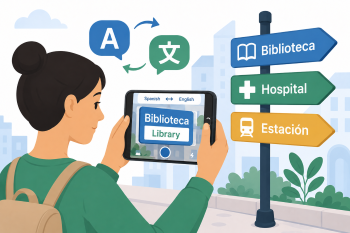
- Demonstrate the camera feature: Point the camera at a text sample and show the live translation overlay.
- Learners practise with prepared text samples in pairs.
- Discuss the translations together: Are they accurate? What do the texts mean? What action might be needed?
- Optional outdoor activity: Take a short walk and use the camera on real signs, menus, or notices.
- Debrief: Learners share the most useful or surprising translation they found.
🧂 Διαφοροποίηση και Συμπερίληψη
- For beginners: Focus on single words and simple labels; avoid complex documents.
- For advanced learners: Ask them to explain the translated text to a classmate in simple language.
- For learners without smartphones: Pair with a classmate or use a classroom tablet.
🍴 Αξιολόγηση και ανατροφοδότηση
| Κριτήριο | Έξοχα | Καλά | Χρειάζεται δουλειά |
| Tool use | Uses Google Translate camera feature independently and confidently | Uses the tool with some guidance | Requires significant support to use the camera feature |
| Comprehension of translated text | Accurately understands and explains the meaning of translated texts | Understands most content with minor gaps | Struggles to understand the translated content |
| Vocabulary acquisition | Records and uses 5+ new words from the activity | Records 2-4 new words | Records fewer than 2 new words |
⚠️ Ηθική, Ιδιωτικότητα & Διασφάλιση Προστασίας
- Remind learners not to photograph people or private property without permission.
- Ensure learners understand that AI translations may not be 100% accurate.
- Do not use the camera feature to photograph personal or sensitive documents.
- Follow school policies on mobile phone use during class activities.
🍱 Επεκτάσεις / Συνέχειες
- Assign a homework task: photograph and translate 5 texts in your neighbourhood.
- Create a class “Translation Scrapbook” with interesting or useful real-world translations.
- Explore other Google Translate features: voice translation, offline mode, conversation mode.
🔗 Σύνδεση μεταξύ γνωστικών αντικειμένων
Αναφορές και Πηγές
Google Translate: https://translate.google.com
Google Translate App: Available on iOS and Android