
Brug af AI til at forfine et CV og en ansøgning
En praktisk workshop for undervisere, der skal lære voksne kursister med migrantbaggrund, hvordan man bruger kunstig intelligens som en vigtig partner til at gennemgå og forfine deres eksisterende CV'er og ansøgninger, med fokus på overensstemmelse med jobbeskrivelser og professionel præsentation.
DIGCOMPEDU KOMPETENCEOMRÅDE(R)
Undervisning og læring, Styrkelse af kursister, Fremme af kursisters digitale kompetence
Tid
Forberedelse: 45 min
Implementering: 120 min
Underviserens progressionsniveau
Udforsker
Målgruppe
Alle kursister med migrantbaggrund
MINIMUM DIGITAL FÆRDIGHEDSNIVEAU FOR KURSISTER
Mellem
MINIMUM KURSISTENS SPROGNIVEAU
B1 – C1
🎓 Læringsmål
Læringsmål:
- Brug et AI-værktøj (som ChatGPT eller en dedikeret ATS-tjekker) til at udføre en gap-analyse, hvor du sammenligner deres CV/ansøgning med en specifik jobbeskrivelse for at identificere manglende søgeord og færdigheder.
- Anvend AI-genereret feedback til strategisk at forbedre egne dokumenter, forbedre relevans og effekt uden at miste egen autentiske stemme og oplevelse.
- Evaluér og verificér AI-forslag kritisk for at sikre nøjagtighed og undgå generisk eller vildledende indhold.
Ingredienser
| Ressource | Mængde | Formål |
|---|---|---|
| Anonymiseret eksempel på CV og jobbeskrivelsespar | 1 sæt pr. deltager | Til øvelse og analyse. |
| "AI-anmelder"-promptbogen | 1 pr. underviser | Et udleveret materiale med specifikke, afprøvede opgaver til forskellige gennemgangsopgaver (se bilag). |
| Strategisk revisionsark | 1 pr. kursist | En skabelon til at logge AI-feedback, beslutte ændringer og notere foretagne rettelser. |
| "Rødt flag/bifaldsrunde"-kort | 1 sæt pr. par | Et fysisk kort, der opfordrer til kritisk evaluering af AI-output (den ene side rød, den anden side grøn). |
| Lokal vejledning til CV-formater | 1 digital kopi | En opsummering af lokale normer (fx foto? Længde? Forventede personlige oplysninger). |
🔧 Redskaber
• Enheder: Bærbar computer eller tablet pr. deltager/par. • Adgang til AI-værktøj: Adgang til en kompatibel LLM som ChatGPT 4o, Claude eller Gemini. Valgfrit en gratis ATS-simulator (Applicant Tracking System) som Jobscan.co. • Internet: Stabil forbindelse kræves. • Platform: Videokonferencer med skærmdeling og grupperum, hvis online.
🥣 Forberedelse – før gennemførslen
- 1. Lav øvelsesmaterialer: Find eller lav et realistisk, men anonymiseret CV og en detaljeret jobbeskrivelse. Sørg for, at der er tydelige, læringsvenlige huller mellem dem (fx mangler CV'et et nøgleord som "projektledelse", ansøgningen nævner ikke en påkrævet færdighed).
- 2. Test prompterne grundigt: Udvikl og test prompterne i promptbogen "AI Reviewer" for at sikre, at de giver ensartet, nyttig feedback, der ikke er fokuseret på skrivning.
- 3. Forbered den kritiske linse: Forvent almindelige dårlige AI-forslag (fx at tilføje for prangende jargon, opfinde bløde færdigheder) til at diskutere i "Rødt flag"-aktiviteten.
- 4. Opret et delt arbejdsområde: Et simpelt Google-dokument eller en Padlet, hvor deltagerne kan poste et "før og efter"-eksempel på en forbedret punktopstilling.
🔥 Trin i klassen/online
Del 1: Indramning af værktøjet (30 min):
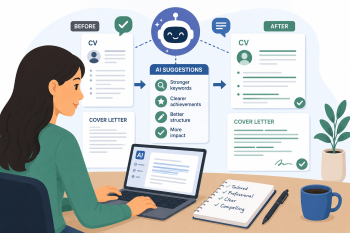
- 1. Problemintroduktion (10 min): Start med problemet: "Du er en kvalificeret ingeniør, men dit CV bliver ved med at blive afvist. Hvorfor?" Introducer konceptet med ansøgersporingssystemer (ATS) og menneskelige scannere, der leder efter et "match". Forklar, at AI fungerer som en "simulator", der kan teste dokumenter mod disse filtre.
- 2. AI-demonstration (20 min): Vis en dårlig prompt ("Skriv et CV til mig til et sygeplejerskejob.") vs. en god prompt ("Analyser overensstemmelsen mellem dette CV og denne jobbeskrivelse."). Demonstrer forskellen i output. Fremhæv: "Din erfaring er hellig. AI's opgave er at hjælpe dig med at præsentere den effektivt til en specifik målgruppe."
Del 2: Den praktiske gennemgang (70 min):
- 3. Aktivitet 1: Analyse af nøgleord og færdighedsmangler (25 min): Deltagerne bruger parvis Prompt 1 fra Promptbogen med eksempel-CV og jobbeskrivelse. Brug AI til at generere en liste over nøglefærdigheder/verber fra jobbeskrivelsen og tjek CV'et for dem. Deltagerne registrerer derefter mangler på det strategiske revisionsark. Kontrolpunkt: Grupperne deler ét nøgleord, der mangler i CV'et.
- 4. Aktivitet 2: Gennemgang af "Rødt flag / Applausrunde" (30 min): Deltagerne bruger opgave 2 til at få AI-feedback på tonen og argumentationen i deres følgebrev. For hvert AI-forslag skal de bruge det fysiske kort til at give det et "Rødt flag" (vagt, vildledende) eller en "Applausrunde" (specifikt, handlingsrettet). De skal begrunde deres valg over for deres partner og notere på arbejdsarket, hvilke forslag de vil implementere.
- 5. Aktivitet 3: Strategisk omskrivning (15 min): Deltagerne vælger et punkt fra deres CV at forbedre baseret på gap-analysen. De omskriver det selv og bruger kun AI til synonymgenerering ("Giv mig 5 stærkere handlingsverber for 'ansvarlig for'") eller klarhedstjek ("Er denne sætning tydelig?"). De poster "før og efter" i det delte arbejdsområde.
Del 3: Syntese og kritiske retningslinjer (20 min):
- 6. Diskussion: Evaluering af AI-rådgivning (10 min): Led en diskussion: "Hvordan ved du, at AI'ens råd er gode?" Etabler en protokol: • Krydstjek: Stemmer forslaget overens med dine erfaringer? • Menneskelig kontrol: Ville en betroet mentor eller rådgiver være enig? • Kulturtjek: Passer det til lokale professionelle normer (se den lokale vejledning i CV-formater)?
- 7. Lektionsplanlægning for undervisere (10 min): Underviserne reflekterer over, hvordan de ville strukturere denne session for deres kursister. Hvilken støtte ville deres specifikke kursister have brug for? De begynder at skitsere en disposition til lektionen.
🧂 Differentiering og inklusion
- For kursister med komplekse karrierer: Fokuser AI-analysen på oversættelse af færdigheder – hjælp til at identificere, hvordan "diagnosticerede patienter" oversættes til "analyserede komplekse data og implementerede løsninger".
- For kursister med huller i beskæftigelsen eller karriereskift: Vejled AI'en til at hjælpe med at omformulere oplevelser strategisk, ikke skjule dem. Spørgsmål: "Hvordan kan jeg præsentere min tid til at administrere en husholdning som relevant for kontoradministration?"
- Sproglig støtte: Opfordr til brug af kunstig intelligens til at kontrollere formuleringer og klarhed uden at omskrive: "Er denne sætning i mit følgebrev grammatisk korrekt og professionel?"
🥄 Vurdering og feedback
| Kriterier | Fremragende | God | Behøver arbejde |
| Brug af AI-værktøj | Brugte chatbot uafhængigt til at generere og tilpasse svar | Med en vis støtte | Med betydelig vejledning |
| Personalisering af svar | Effektivt personliggjort eksempelsvaret med relevante detaljer | Delvist personliggjort | Kopieret eksempelsvaret |
| Klarhed i det talte svar | Klar udtale og selvtillid | For det meste klart med lidt tøven | Svært at forstå |
⚠️ Etik, privatliv og beskyttelse
- Indtast aldrig personligt identificerbare oplysninger (telefon, adresse, ID-numre) i en offentlig AI. Brug anonymiserede versioner til øvelse.
- Ægthed og svindel: Hav en seriøs diskussion om grænsen mellem forbedring og fabrikation. Understreg, at AI ikke må opfinde kvalifikationer, job eller færdigheder. At lyve på et CV er svindel og vil blive afsløret.
- Dataejerskab: Mind kursisterne om, at platforme kan bruge uploadede data til at træne modeller. Udfør den sidste finpudsning offline.
🍱 Udvidelser/opfølgninger
- Simuleret ATS-scanning: Brug et gratis værktøj som Jobscan til at vise en "matchrate" før og efter revisioner, og kvantificer forbedringen.
- Interviewsimulatoren: Brug AI til at generere potentielle interviewspørgsmål baseret på det reviderede CV, hvilket skaber en sammenhængende løkke fra ansøgning til interview.
- Sektorspecifikke workshops: Tilpas opgaverne til specifikke områder (sundhedsvæsen, ingeniørvidenskab, IT), som dine kursister er målrettet mod.
🔗 Brug AI på tværs af fag
📚 Referencer og ressourcer
APPENDIKS: Håndbogen til AI-anmeldere Indsæt altid jobbeskrivelsen og dit dokument (CV eller følgebrev) først i AI'en. jobscan.co Link
Prompt 1: Gap-analytikeren: "Fungér som karriererådgiver. Jeg giver dig en jobbeskrivelse og et CV. Først skal du liste de 8-10 vigtigste færdigheder og nøgleord fra jobbeskrivelsen. Analysér derefter CV'et. For hvert nøgleord skal du angive, om det er: 1) Tydelig til stede, 2) Implicit, men ikke angivet, eller 3) Mangler. Giv et simpelt resumé til sidst."
Prompt 2: Argument- og tonetjekker (til følgebreve): "Gennemgå dette følgebrev for den vedhæftede jobbeskrivelse. Omskriv det ikke. Vurdér: 1) Omhandler det direkte mindst 3 nøglekrav fra jobbeskrivelsen? 2) Er tonen professionelt sikker? 3) Er det indledende afsnit overbevisende? Giv feedback i punktform, hvor du citerer specifikke linjer fra brevet."
Prompt 3: Stærkere handlingsverber: "Jeg har denne punktliste fra mit CV: '[Indsæt original punktliste]'. Jobbet kræver færdigheder i [fx teamwork, analyse]. Foreslå 3-4 stærkere, mere aktive måder at formulere denne præstation på uden at ændre dens faktuelle betydning. Fokusér på verberne."
Prompt 4: Kontrol af klarhed og korthed: "Gennemgå følgende afsnit fra mit følgebrev. Er det klart, præcist og professionelt? Hvis ikke, så foreslå kun, hvad der skal ændres (fx 'opdel denne lange sætning', 'brug et mere specifikt ord end "god"'), men omskriv det ikke for mig. Afsnit: [Indsæt afsnit]"