
Att använda NotebookLM som studiepartner
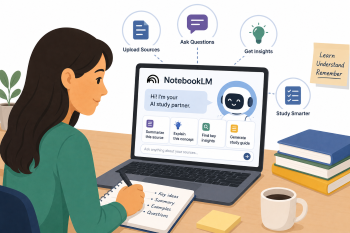
En praktisk workshop som introducerar vuxna elever till Google NotebookLM som en personlig AI-studiepartner — där de laddar upp sitt eget material, genererar sammanfattningar, extraherar nyckelbegrepp och skapar övningsfrågor för självständigt och egenstyrt lärande.
DigCompEdu-Kompetensområde(n)
Digitala resurser, Undervisning och lärande, Stärka elevers egenmakt, Underlätta elevernas digitala kompetens
Tid
Förberedelse: 30 minuter
Genomförande: 90 min
Utbildningspersonals Nivå
Utforskare och Integrerare
Målgrupp
Vuxna deltagare Gruppstorlek: 10–15 Språknivå B1–C1 Studieteknik och akademiskt stöd
Minimikrav på Elevernas Digitala Färdigheter
Grundläggande
Minimikrav på Elevernas Språknivå
B1-C2
🎓 Lärandemål
När den här lektionen är avslutad kommer lärarna att ha de kunskaper som krävs för att lära eleverna hur man:
- Skapa en NotebookLM-anteckningsbok och ladda upp personligt studiematerial (PDF-filer, Google Docs, webblänkar).
- Använda NotebookLM för att sammanfatta komplexa texter och extrahera nyckelbegrepp och ordförråd.
- Skapa övningsfrågor och delta i AI-driven dialog för att fördjupa förståelsen av studieämnen.
- Kritiskt utvärdera AI-genererade sammanfattningar och verifiera informationen mot originalkällorna.
Ingredienser
| Objekt / Resurs | Antal | Syfte |
|---|---|---|
| Exempel på studiematerial | 1 uppsättning per deltagare | Korta artiklar, utdrag ur läroböcker eller nyhetsrapporter (PDF-filer, Google Docs, webblänkar) om ett relevant ämne |
| "NotebookLM Navigator" – vägledning | 1 per deltagare | Beprövade uppmaningar för sammanfattning, frågeställning och diskussion med NotebookLM |
| Tillgång till NotebookLM (Google-konto krävs) | 1 per deltagare | Grundläggande AI-studieverktyg – gratis via notebooklm.google |
| Enheter med internetåtkomst | 1 per deltagare | För att komma åt NotebookLM och ladda upp material |
Utrustning
- Bärbara datorer, surfplattor eller stationära datorer med internetanslutning (smartphones rekommenderas inte för denna aktivitet)
- Google-konton för alla deltagare (krävs för åtkomst till NotebookLM)
- Projektor eller delad skärm för demonstration
- Utskriven eller digital "NotebookLM Navigator" – vägledning
🥣 Förberedelser – före genomförandet
- Välj 3–4 exempel på studiematerial som passar gruppens nivå och intressen: korta artiklar (300–500 ord), ett utdrag ur en lärobok eller en nyhetsartikel. Se till att allt material är allmänt tillgängligt eller att upphovsrätten är klarad.
- Förbered ”NotebookLM Navigator”-guiden med beprövade uppmaningar för att sammanfatta avsnitt, förklara ordförråd, skapa övningsfrågor och inleda dialoger om ämnet.
- Skapa en demo-anteckningsbok i NotebookLM i förväg med exempelmaterialet förinstallerat, så att du kan demonstrera funktionerna utan fördröjningar vid inställningen.
- Se till att alla deltagare har aktiva Google-konton. Om vissa inte har det, förbered en lösning (t.ex. ett delat demokonto eller att de parar ihop sig med en deltagare som har ett).
- Testa NotebookLMs funktioner för sammanfattning och generering av frågor med det valda materialet för att förutse eventuella begränsningar eller oväntade resultat.
🔥 Steg för implementering (i klassrummet/synkront)
Del 1: Konfigurera NotebookLM (15 minuter)
- (5 min) Introduktion: Vad är NotebookLM? Förklara att det är ett personligt AI-studieverktyg som endast fungerar med det material du laddar upp – till skillnad från allmänna AI-chattbotar utgår det uteslutande från dina egna källor.
- (10 min) Guidad installation: Deltagarna öppnar NotebookLM, skapar en egen ny anteckningsbok och laddar upp 1–2 av de tillhandahållna exempelmaterialen. Ge stöd vid eventuella tekniska problem.
Del 2: Förstå och sammanfatta med NotebookLM (45 minuter)
- (10 min) Introduktion – Att tolka komplexa texter: Diskutera utmaningen med att förstå långa eller komplexa texter på ett nytt språk. Presentera NotebookLMs funktioner för sammanfattning och förklaring.
- (15 min) Demonstration – Sammanfattning och nyckelbegrepp: Visa hur man väljer ett komplext stycke och ber NotebookLM att ”sammanfatta detta stycke i tre meningar” eller ”förklara huvudtanken i detta avsnitt”. Visa hur man extraherar nyckeltermer och definitioner.
- (20 min) Guidad övning — Att utvinna kunskap: Deltagarna arbetar med en av sina uppladdade källor och använder NotebookLM för att: (a) sammanfatta ett specifikt avsnitt; (b) be NotebookLM förklara 2–3 okända ord eller begrepp; (c) skapa en lista med 5 viktiga slutsatser från hela dokumentet.
Del 3: Interaktivt lärande och förberedelse inför bedömning (30 minuter)
- (10 min) Introduktion – Aktivt lärande: Diskutera fördelarna med aktivt återkallande och självtestning för effektivt lärande. Presentera NotebookLMs förmåga att generera frågor och delta i dialog.
- (15 min) Demonstration — Quiz och diskussion: Visa hur man ber NotebookLM att ”Skapa 5 flervalsfrågor om [ämne] utifrån denna källa” eller ”Agera som handledare och diskutera konsekvenserna av [begrepp] med mig.”
- (20 min) Guidad övning — Testa dina kunskaper: Deltagarna använder NotebookLM för att: (a) generera 3–5 övningsfrågor baserade på sitt studiematerial; (b) försöka svara på frågorna och använda NotebookLM för att kontrollera svaren eller få ytterligare förklaringar; (c) delta i en kort konversation om ett utmanande begrepp från sina källor.
🧂 Anpassning och inkludering
- För lägre digital kompetens: Tillhandahåll förinstallerade anteckningsböcker med källor som redan har laddats upp. Fokusera på grundläggande sammanfattningar och enkla frågor. Para ihop eleverna med elever som är mer vana vid digitala verktyg.
- För lägre språknivåer (B1): Använd enklare studiematerial. Fokusera på sammanfattningar i en enda mening och förklaringar av ordförråd. Uppmuntra användning av NotebookLM:s konversationsfunktioner för grundläggande språkövning.
- För högre språknivåer (B1+): Uppmuntra till kritisk granskning av NotebookLMs sammanfattningar och förklaringar. Utmana eleverna att använda NotebookLM för att sammanfatta information från flera källor eller förbereda sig för komplexa debatter och presentationer.
- För elever som förbereder sig för formella kvalifikationer: Använd NotebookLM med tidigare provuppgifter eller officiella studieguider som uppladdade källor.
🥄 Bedömning och återkoppling
| Kriterium | Utmärkt | Bra | Behöver förbättras |
| Inställning och navigering i NotebookLM | Skapar självständigt en anteckningsbok, laddar upp material och navigerar bland alla viktiga funktioner | Konfigurerar anteckningsboken med lite stöd; navigerar bland de flesta funktionerna | Behöver betydande stöd för att konfigurera eller navigera i NotebookLM |
| Sammanfattning och utdrag av nyckelbegrepp | Skapar korrekta sammanfattningar och identifierar tydligt fem viktiga slutsatser från källan | Skapar mestadels korrekta sammanfattningar med mindre brister | Har svårt att skapa användbara sammanfattningar eller identifiera nyckelbegrepp |
| Övning i att generera frågor och självtest | Skapar relevanta frågor, försöker svara på dem och använder feedback från NotebookLM på ett effektivt sätt | Skapar frågor och försöker svara på dem med viss vägledning | Har svårt att generera frågor eller ta till sig AI-feedback |
| Kritisk utvärdering av AI-resultat | Identifierar tydligt var NotebookLM är korrekt och var verifiering behövs | Visar viss medvetenhet om AI:s begränsningar vid uppmaningar | Accepterar alla AI-resultat utan kritisk utvärdering |
⚠️ Etik, integritet och säkerhet
- Dataskydd: Även om NotebookLM är en Google-produkt bör användarna ändå vara försiktiga med att ladda upp mycket känslig personlig eller konfidentiell information. Använd anonymiserade eller allmänt tillgängliga dokument för övningar.
- AI:s begränsningar: NotebookLM är ett verktyg som underlättar förståelsen, inte en ersättning för kritiskt tänkande eller mänsklig undervisning. Det kan ibland misstolka sammanhanget eller ge ofullständig information.
- Verifiering av information: Betona vikten av att jämföra information från NotebookLM med originalkällor och andra tillförlitliga källor, särskilt när det gäller viktiga fakta.
- Data i Google-kontot: Påminn eleverna om att material som laddas upp till NotebookLM behandlas av Google. Gå igenom Googles integritetspolicy och användarvillkor tillsammans med gruppen.
🍱 Fördjupning / Uppföljningar
- Forskningsprojektassistent: Eleverna använder NotebookLM för att organisera källor och formulera forskningsfrågor för ett mindre projekt.
- Ordförrådsbyggare: Eleverna använder NotebookLM för att skapa flashkort eller ordlistor utifrån sitt studiematerial.
- Generator för presentationsdisposition: Eleverna laddar upp källor till presentationen och ber NotebookLM att hjälpa till att strukturera en disposition.
- Ljudöversikt: Använd NotebookLMs funktion ”Ljudöversikt” för att skapa en sammanfattning i podcast-stil av uppladdat material för lyssningsövningar.
🔗 Ämnesövergripande koppling
Referenser och resurser
NotebookLM: https://notebooklm.google Tillgång till verktyget och officiella guider https://notebooklm.google —
Google Workspace Learning Center: https://support.google.com/a/users/answer/13931109 Resurser och handledningar för NotebookLM
Project Gutenberg (texter i det offentliga området) https://www.gutenberg.org Gratis studiematerial
Wikipedia (för övningsuppladdningar) https://www.wikipedia.org Allmänt tillgängligt referensinnehåll